Help & Support
Answers for grown-ups, from setting up at the sink to moving players to a new phone.
Still stuck?
Email support@playmegachomp.com
Tell us what happened and which version you have. The version is at the very bottom of Megachomp's Settings.
Getting started
How do we set it up the first time?
The first time Megachomp opens, three quick welcome screens explain the game, where the phone goes, and that the camera stays on the phone. The last one has a TURN ON SHARK CAM button, which asks for the camera. (Tap Not now to skip it for now.)
Then tap + ADD PLAYER, type a name and pick a first buddy: three sharks and a dolphin to start, with lots more in eggs.
Where should the phone go?
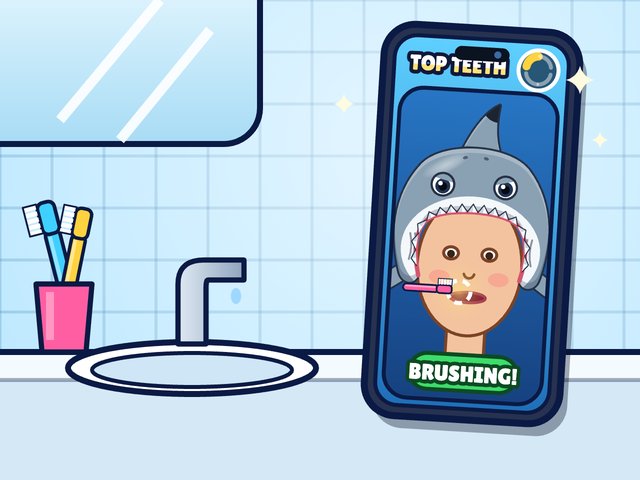
Prop it up about an arm's length away, where the front camera can see your child's face. The announcer says which teeth to brush, all the way through.
What happens during a brush?
Tap BRUSH! on the home screen. After the 3, 2, 1, the announcer calls out each part of the mouth: the top teeth on one side, then the other side, then the bottom teeth the same way. While your child brushes, their shark battles candy Sugar Bugs. When time's up, the prizes and eggs come out.
How long is a brush?
1:30 to start. A grown-up can pick 1 minute, 1:30 or 2 minutes in Settings, under Brushing time.
Do we need the internet?
No. Megachomp works offline, so brushing and playing don't need Wi-Fi. Only Family Sync needs the internet.
Shark Cam
What does Shark Cam do?
Shark Cam uses the front camera to tell when your child is brushing. It shows your child on the screen in a cartoon hood of their buddy, with a glowing target on the teeth to brush next. While it sees brushing, the shark chomps fast.
The face and hand tracking runs on the phone. No picture or video is recorded, stored or sent. More in the Privacy Policy.
The shark slows down while my child is brushing
Shark Cam needs to see your child's face, and the hand holding the brush near the mouth. Try these:
- Move the phone so your child's face is in the middle of the Shark Cam picture, about an arm's length away. If the picture says “Put your face here!”, it can't see a face yet.
- Keep the brushing hand in view. With no hand at the mouth, it takes much bigger mouth movements to count as brushing.
- Check it with the detector test: open Settings and tap TEST BRUSH DETECTOR. Brush in front of the phone. The bar should cross the white line while brushing and drop when you stop. Tap DONE when you're finished.
Can we play without the camera?
Yes. In Settings, turn off Shark Cam (camera). The shark then battles for the whole brush, on the honor system. Chomp Cam can be played with a finger instead.
The camera never turns on
If Megachomp isn't allowed to use the camera, open the iPhone's Settings app, then Megachomp, and turn on Camera. Also check that Shark Cam (camera) is on in Megachomp's own Settings.
Settings (for grown-ups)
How do I open Settings?
Tap the gear in the top-right corner of the home screen. Then answer the grown-up question, a multiplication like 7 × 8, on the keypad. A wrong answer brings a new question.
What's in Settings?
- Shark Cam (camera), Sound effects, Music and Voice switches.
- Brushing time: 1 min, 1:30 or 2 min.
- rename, next to the name of the player who's playing now.
- Save Code, for backing up and moving players (see below).
- Family Sync (see below).
- TEST BRUSH DETECTOR, to check Shark Cam.
- Problem log: notes about any glitches the game recovered from. It says “No problems logged” when there aren't any.
- Show the welcome screens, to see the first-time setup again.
- Reset or remove the current player, at the bottom.
Players & phones
How do I add another player?
On the home screen, tap the player's name in the top-left corner to open WHO'S BRUSHING?. Tap + ADD PLAYER and type a name. Up to four players fit on one phone, each with their own buddy, levels and cards.
How do we switch players?
Tap the player's name in the top-left corner of the home screen, then tap who's brushing. When there's only one player, Megachomp opens straight to their home screen.
How do I rename, reset or remove a player?
Switch to that player first, then open Settings. Tap rename next to their name, or use the reset and remove links near the bottom. Resetting starts them over at level 1 and their cards are lost, so make a Save Code first if you might want them back.
How do I back up, or move players to a new phone?
Use a Save Code. In Settings, tap COPY SAVE CODE. The Save Code is a block of text with every player's levels and cards. Paste it somewhere safe, like Notes or a text to yourself.
To restore it on another phone, tap Use a Save Code on its first screen (or open Settings and tap RESTORE…), paste the code and tap RESTORE. Restoring replaces the players on that phone.
Family Sync
What is Family Sync?
An optional way to share the same players between your family's phones, so a brush on either phone counts on both. It's off until a grown-up turns it on.
How do I set it up?
- On the first phone, open Settings, find Family Sync and tap START, then TURN ON. You'll get a 12-character family code that looks like ABCD-EFGH-JKMN.
- On the other phone, open Settings, tap I HAVE A CODE under Family Sync, type the code and tap JOIN. A brand-new phone can tap Join your family on its first screen instead.
Players on both phones combine. Nobody loses a level or a card.
When do the phones sync?
On their own, while Megachomp is on its home screens and online, never in the middle of a brush or a game. To sync right away, tap SYNC NOW under Family Sync in Settings.
Is Family Sync private?
Yes. The players' names and progress are locked with your family code before they leave the phone, so our server only keeps a copy nobody else can read. There are no emails or accounts. The Privacy Policy has the details.
We lost our family code
Any phone that's syncing shows the code under Family Sync in Settings, with a COPY CODE button. The code never leaves your phones, so we can't look it up for you.
How do I stop syncing, or delete our family's copy?
- To stop on one phone: Settings → Family Sync → Stop syncing on this phone. Its players stay on it, but its brushes stop reaching the other phones.
- To delete your family's copy from our server: Settings → Family Sync → Delete the family copy, then confirm. Every phone keeps its players, and Family Sync turns off on all of them.
Playing the game
What are shark teeth for?
Teeth are the game's treasure. Kids earn them by brushing, from the daily treasure and streak prizes, and in mini-games. They spend them in the Egg Shop (the SHOP button) on eggs. There's no real money anywhere in Megachomp.
How do cards get stronger?
Hatch the same card again and it gets a star. The fifth star makes it shiny, and three more copies make it rainbow. Every card adds to Ocean Power, which makes the buddy hit harder.
How do the mini-games work?
Every brush earns one play, used on one game. Plays don't pile up, so it's one game after each brush. The PLAY menu offers three of the open games each day, a different mix every day. Games last about a minute and end on their own.
Feeding Frenzy, Shark Race, Aquarium, Buddy Puzzle and World Explorer are open from the start. The rest unlock one at a time with the level-road treasure every 50 levels, or sooner with a Game Egg from the shop.
Why can't my kid brush again?
The brushing game opens once in the morning and once at night (the night one from 2 pm), so it can't be replayed just for more eggs. If your kid needs an extra brush, a grown-up can allow one more in Settings.
What happens at a boss?
Every tenth level is a boss. Brushing breaks its candy armor and blocks its big charge attacks. If the boss is still standing when time runs out, it gets away, and it's waiting at the next brush.
How do daily treasure and streaks work?
The first brush of each day opens that day's treasure. Brushing on days in a row builds a streak, with prizes at 3, 7, 14, 21 and 30 days. Brushing once before 2 pm and once after 2 pm on the same day (morning and night) earns a bonus egg.
Contact us
Email support@playmegachomp.com. Please tell us what happened and the version from the bottom of Settings. If the game hit a glitch, Settings → Problem log has notes you can copy into your email.
Questions about privacy, or want us to delete data? Use the same address, and see the Privacy Policy.